Write without distractions
A visual editor keeps the focus on your words, so you can move from a blank page to a finished post without wrestling with a CMS.
Thooval turns your writing into a blog you control. Create posts on your Mac, publish your own website in one click, and keep every draft and published post yours.
Write and organize every post in one focused desktop app.
Your posts and website live in accounts and files you control.
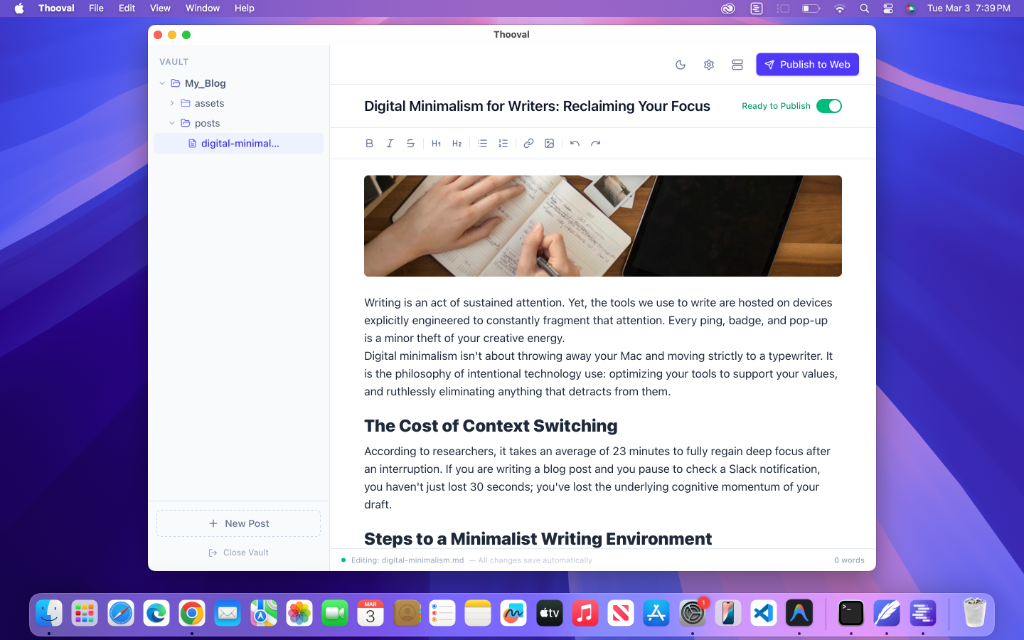
One click takes your post from draft to live on your blog.
Start writing instead of setting up another website platform.
Turn finished posts into a live blog with one click.
Use free GitHub Pages hosting instead of paying a platform every month.
Write in a clean Mac app, keep every post organized on your computer, then click Publish. Thooval handles the route to your own live website.
Create and organize your writing locally, then publish it through a hosting layer you do not have to pay for.
A visual editor keeps the focus on your words, so you can move from a blank page to a finished post without wrestling with a CMS.
Create new posts, save drafts automatically, and decide exactly what appears on your live blog.
Connect your account once, then publish a finished blog to your own GitHub Pages website in one click.
Your work stays in portable files on your Mac, while the published blog lives in a repository you control.
Thooval is for anyone who wants a focused writing app and a simple way to put that writing on a website they own.
See how Thooval takes you from a blank page to a website you control.
See the publishing workflowCompare a writing-only workflow with one that can publish the finished post too.
Compare Thooval with TyporaBrowse practical guides for starting, growing, and owning your developer blog.
Explore the guidesTurn solutions, lessons, and hard-won experience into useful posts without managing a separate website stack.
Share progress, decisions, and launches without adding a subscription to your stack.
Publish essays, updates, and tutorials from one dependable place that you control.
No. Thooval publishes to GitHub Pages, which hosts public websites for free. A custom domain is optional. See how publishing works.
No. After you connect your GitHub account, writing, managing posts, and publishing all happen inside Thooval.
You do. Your drafts stay on your Mac, and the published website lives in a GitHub repository under your account.
Yes. There is no subscription or license key. You can download the app and inspect the source on GitHub.